
ISO 27001 and IKT audits.
From control to report.
Audhive guides your audit: assess every control, request missing evidence from the people responsible, record risks and findings and hand the management a PDF report. For one company or many tenants – as a cloud subscription operated by us or on your own server.
Personal demo access by e-mail – fictitious companies and data, reset every night.
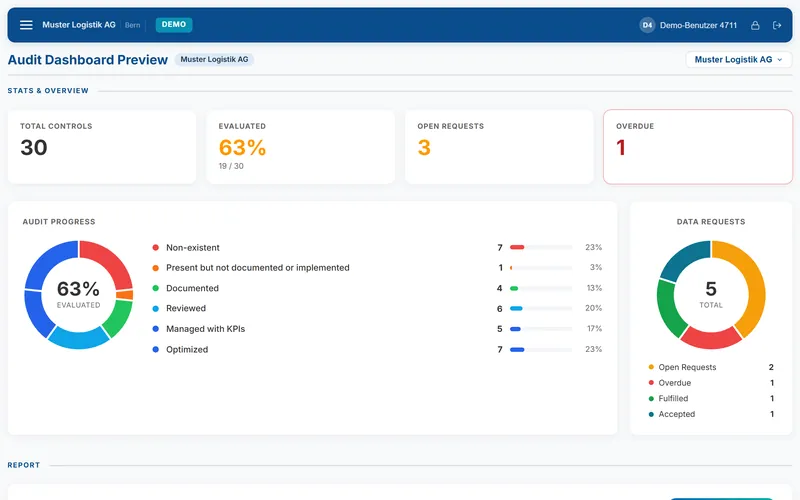
An audit in Audhive – step by step
From the control catalog to the management report. The pictures show the demo instance with fictitious companies and data.
-
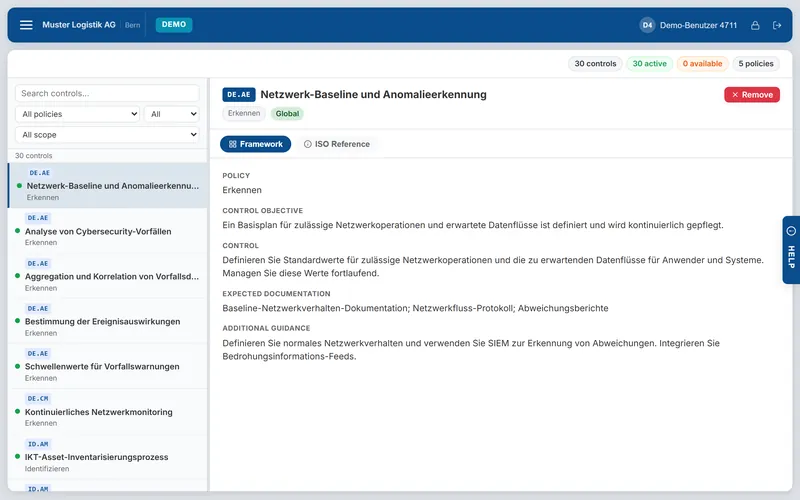
Load the catalog
Load ISO/IEC 27001:2022 or the IKT minimum standard 2023 in the setup – in German or English – or import your own framework as CSV. For each tenant you decide which controls apply.
-
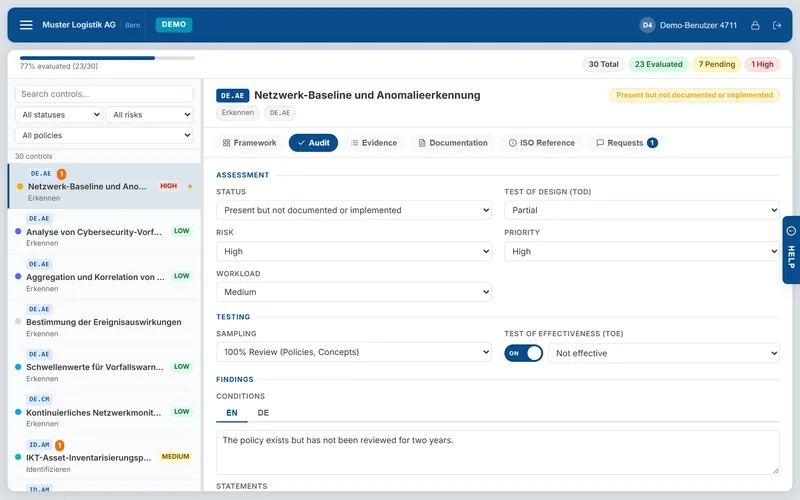
Assess every control
Status, test of design, risk, priority, effort, sample, test of effectiveness and findings in German and English – evidence, documentation and the ISO reference in tabs of the same view.
-
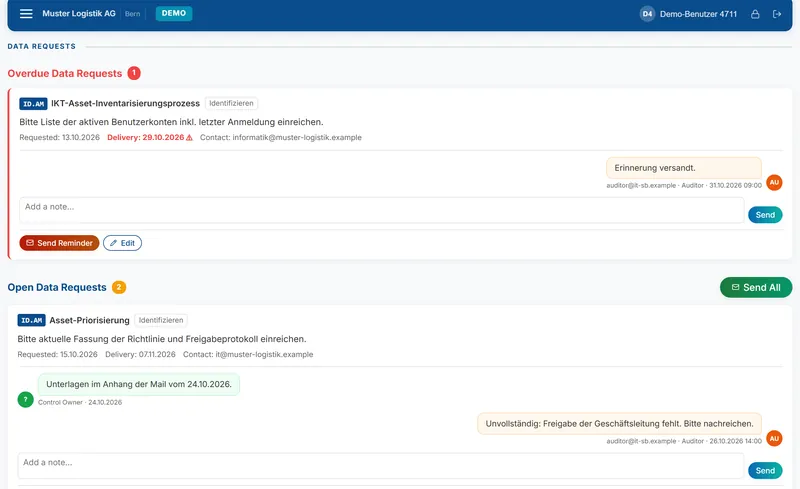
Request missing evidence
A data request with a delivery date goes to the person responsible. Messages and attachments stay with the request; Audhive sends reminders, and you accept or reject what was delivered.
-
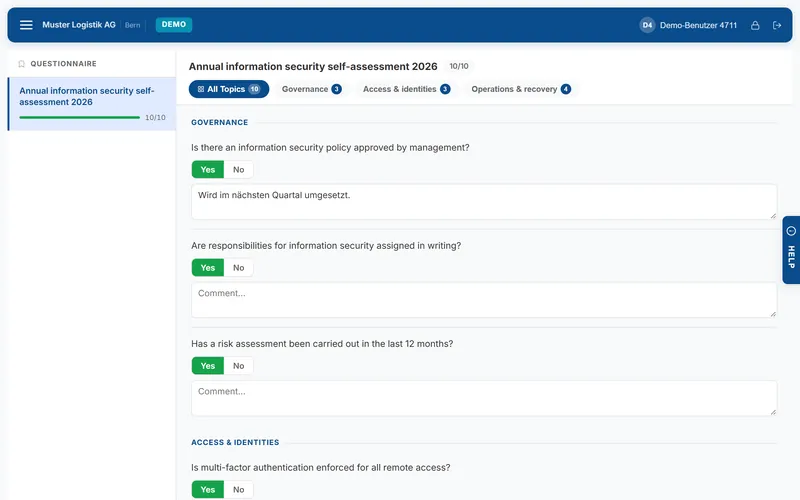
Self-assessments for the ICS
Questionnaires by topic with yes/no answers and comments – for the internal control system, with signatures.
-
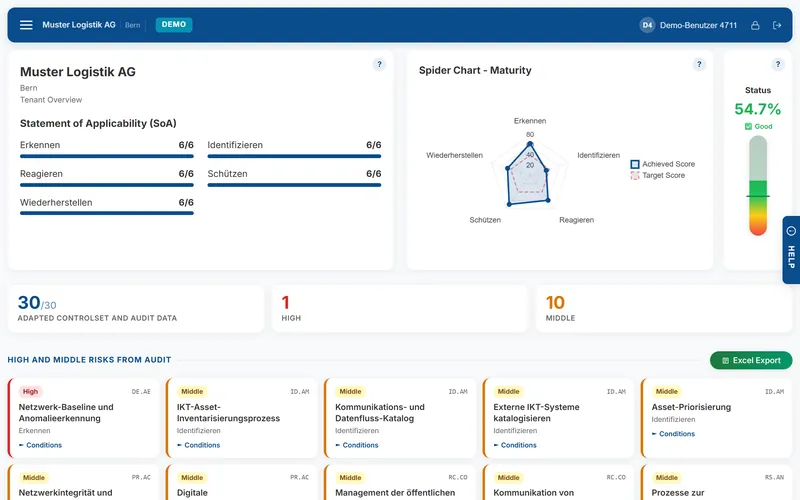
See where you stand
Statement of applicability per function, a spider chart of the maturity against the target and the high and medium risks from the audit – per tenant.
-
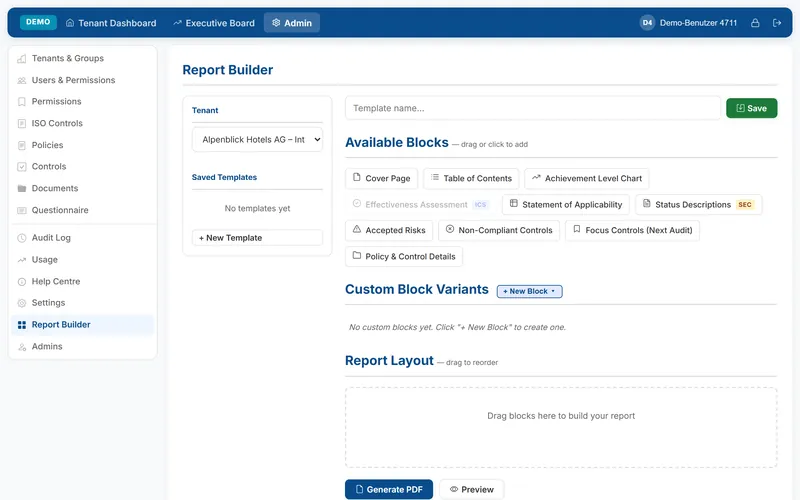
Report to the management
PDF report in German or English straight from the audit dashboard, your own reports from building blocks in the Report Builder, and the Executive Board comparing all tenants.
What Audhive does
Two modes in one software: SEC for the security audit against ISO 27001 or the IKT minimum standard, ICS for the internal control system – FULL combines both.
Controls & catalogs
ISO/IEC 27001:2022 and the IKT minimum standard 2023 included, your own frameworks as CSV. Each control shows policy, objective, control text and the expected documentation.
Audit & evidence
Assess maturity, design and effectiveness, keep evidence and documentation with the control, record risks with priority and effort.
Data requests
Request documents with a delivery date; messages and attachments stay in the request. Reminders by e-mail, open and overdue requests on the dashboard.
Reports & Executive Board
PDF report per tenant in German or English, your own report templates from building blocks, and all tenants compared on the Executive Board.
Questionnaires (ICS)
Self-assessments by topic with yes/no answers and comments, signed and available as PDF.
Tenants & roles
One tenant per company, business unit or client, grouped on the dashboard. Roles decide who sees or edits which area – access is granted per tenant.
Sign-in
Own accounts with password plus a second factor (authenticator app or passkey), or single sign-on with Microsoft Entra ID.
Audit log
Every action and every sign-in is recorded – including field history and the change log of the controls.
German and English
Every user chooses the language; findings can be recorded in both languages and reports created in either.
Backup & updates
In the cloud we do it for you. Self-hosted: backups of the database and files (also scheduled) and signed updates with a backup before installing.
A look inside Audhive
The most important areas at a glance – shown with the demo instance and fictitious companies and data.
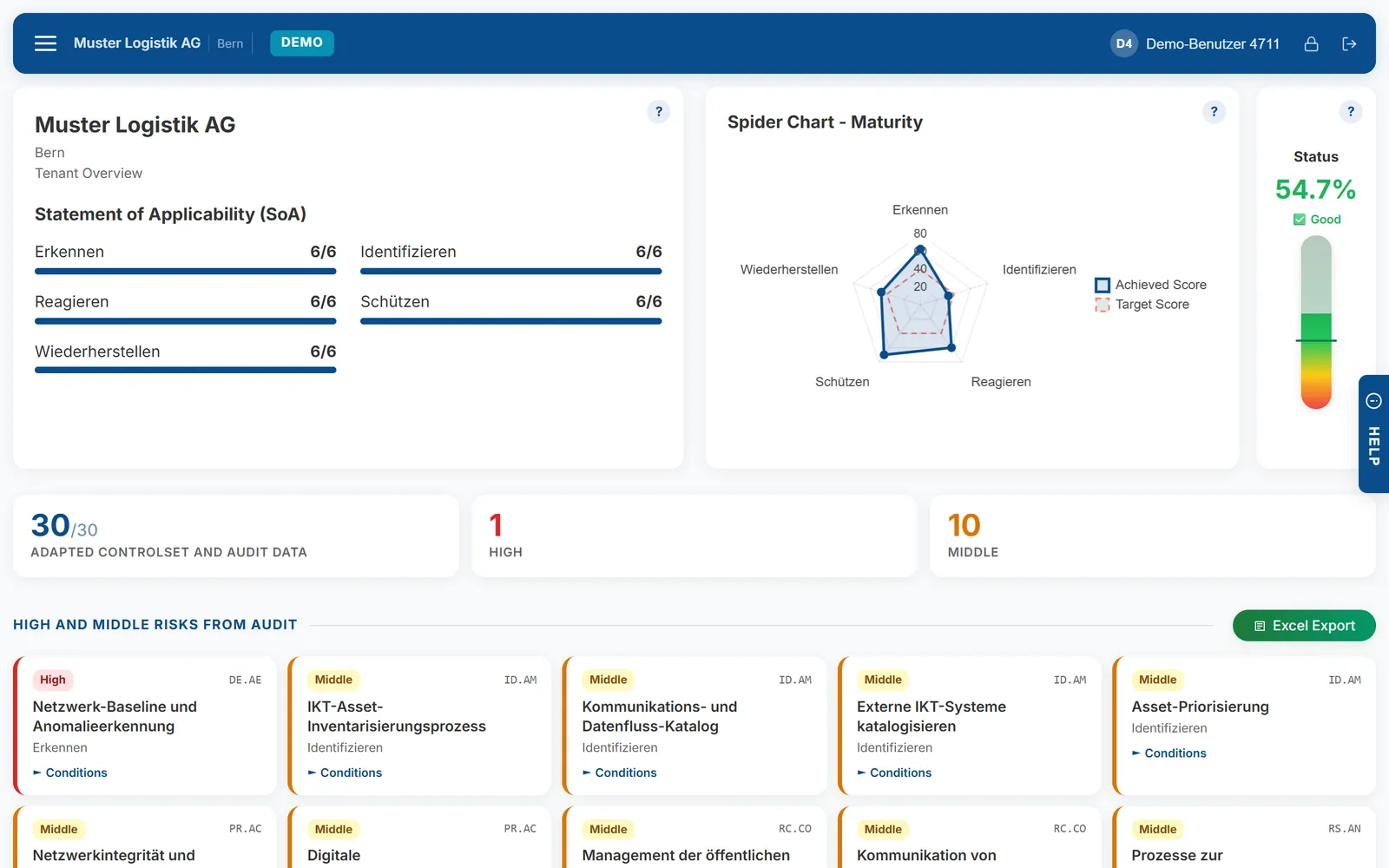
Demo instance with fictitious data. Click the picture to enlarge it.
For security officers, internal audit and the people who advise them
The same software for one company, a group or many clients – the licence defines the mode, the number of tenants and the users.
The annual audit of your own ISMS or ICS
For IT security officers, internal auditors and compliance officers who want to run their audit in one place instead of in spreadsheets and e-mails.
- Catalog loaded in the setup – start the first audit right away
- Data requests to the departments instead of e-mail chains
- PDF report for the management in German or English
Several companies, one overview
For groups with subsidiaries or business units that are audited separately but reported together.
- One tenant per company, grouped on the dashboard
- Executive Board compares all tenants against the target
- Single sign-on with Microsoft Entra ID
Audits for your clients
For IT service providers, fiduciaries, audit and consulting firms that check several clients.
- One tenant per client, access granted per tenant
- Self-hosted on your server or as a cloud subscription
- Resell or refer Audhive – partner conditions by agreement
AI that helps – with your own key.
Everything works without AI. If you want it, you store your own API key from Anthropic (Claude) or OpenAI in Audhive; the provider bills you directly. AI access is included neither in the licence nor in the subscription.
- Nori, the assistant: questions about audits, controls and evidence – also about uploaded documents
- Nori only reads and never changes anything, sees only the current tenant and has no internet access
- AI review of a control: implementation and evidence, with gaps and a summary of 3 to 10 sentences
- Translate content such as controls and audits, ask the built-in help
- Content goes directly from your installation or instance to the AI provider – not via us. You check AI results before applying them.
Evidence for the review of privileged access is present but does not cover the second quarter. The policy requires a quarterly review.
The access control policy is current and approved; it covers the requirements of the control.
Start with a catalog – adapt it to your organisation
Control catalogs included
In the setup (or later under Admin › Import / Export) you load a catalog in German or English – with policy, control objective, control text, expected documentation and guidance for each control.
- ISO/IEC 27001:202294 controlsIncluding Amendment 1:2024 – the international standard for information security management.
- IKT 2023108 controlsThe Swiss IKT minimum standard, structured by identify, protect, detect, respond and recover.
- Every control remains editable; your own frameworks come in as CSV in the same format.
- New versions of Audhive come via the update service with a valid licence; in the cloud we install them for you.
Installation and training
If you need help with the installation or training for your team, we are happy to support you – by arrangement.
- InstallationOn request we install Audhive on your server.
- TrainingIntroduction for your audit and compliance team.
- Get in touch – we will discuss what you need.
Two ways to Audhive
The same software with the same functions – only the operation differs.
We run it, you audit
Your own instance, e.g. yourcompany.audhive.io – nothing to install.
- Choose subscription and addressMode and monthly or yearly billing, the address of your instance, additional tenants or users if needed – pay via PayPal or card on www.it-sb.ch.
- Instance is set up automaticallyWith its own database. Within minutes the welcome e-mail with your setup link arrives (valid for 72 hours).
- Password, second factor, first tenantSet your password, add an authenticator app or a passkey, create the first tenant – and start working.
- Updates and backups by usNightly encrypted backups; under Admin › Account and subscription you manage the subscription, buy more tenants or users and create a support code.
On your own server
Your data stays in your environment. The licence is valid for one installation and is activated online.
- Buy a licenceChoose a package and pay online – licence key and download link come by e-mail.
- Prepare the serverWeb server with HTTPS, PHP 8.1 or newer (8.5 recommended), MariaDB 10.4+ or MySQL 8.0+ with an empty database.
- Run the setup wizardUnpack the ZIP, open setup/setup.php: the licence key comes first and sets mode, tenants and users; then database, sign-in, e-mail and catalog.
- OperateLicence check every 7 days (up to 30 days offline), signed updates under Admin › Update, backups under Admin › Backup.
What Audhive costs
Licensed by mode (SEC, ICS or FULL), tenants and users per tenant. Current prices directly from our shop.
Your own instance at yourcompany.audhive.io, operated by us – with its own database, updates and central backups. Monthly or yearly, renews automatically, cancellable at the end of the term.
Loading current prices …
Subscription (cloud) – prices
The current prices cannot be shown at the moment. Ask us for a quote – or see them on www.it-sb.ch.
On your own server – your data stays in your environment. The licence is valid for one installation, is activated online and keeps working for 30 days without a connection. The download link comes with the licence e-mail.
Loading current prices …
Self-hosted – packages
Tell us the mode, number of tenants and users and the desired term – you will receive a quote.
The current prices cannot be shown at the moment. Ask us for a quote – or see them on www.it-sb.ch.
How licensing works
Already a customer? Add tenants or users · Partners and resellers: resell or refer Audhive · Questions about licensing
Who sees what – and where your data is
Your data
Self-hosted, everything stays on your server – Audhive only contacts the licence and update service (licence status, no audit data). In the cloud, every customer gets an own instance with an own database.
Sign-in
Password plus second factor (authenticator app or passkey) or single sign-on with Microsoft Entra ID.
Roles per tenant
Roles define which areas someone may see or edit – overview, controls, audit, documents, questionnaire, control set, change log, Executive Board, admin.
Traceable
Audit log of every action and sign-in. Support access in the cloud only with your one-time code – every action of the support session is logged.
What your server needs (self-hosted)
For the cloud subscription you only need a current browser. For a self-hosted installation, your server needs the following.
PHP
The application is built on PHP without a framework – a clean PHP installation is sufficient.
MariaDB / MySQL
Audit data, controls, evidence metadata and users are stored in a relational database.
Web server
Reachable via HTTPS – required for passkeys and Microsoft Entra ID.
File storage
Evidence, documents and logos are stored in the file system of the installation – no object storage required.
Sign-in
Microsoft Entra ID (single sign-on) or own accounts with a second factor.
Network
Outbound HTTPS to license.it-sb.ch (licence check every 7 days, up to 30 days offline) and updates.it-sb.ch. Optional: Microsoft Entra ID, e-mail and your AI provider.
Answered briefly
Cloud or self-hosted – what is the difference?
How is Audhive licensed?
Does a self-hosted installation need the internet?
Do I need AI?
Can I add tenants or users later?
Can I try Audhive first?
See for yourself – in the demo
Your personal demo access arrives by e-mail within minutes. For questions about licensing, installation or partnerships, write to us – we answer within one business day.