
Workflows in Audhive
How you work with Audhive: first the audit cycle from control set to report, then the key processes in detail – each with the screens you will see.
An audit in six steps
From the control set to the management report. Click a picture to enlarge it.
-
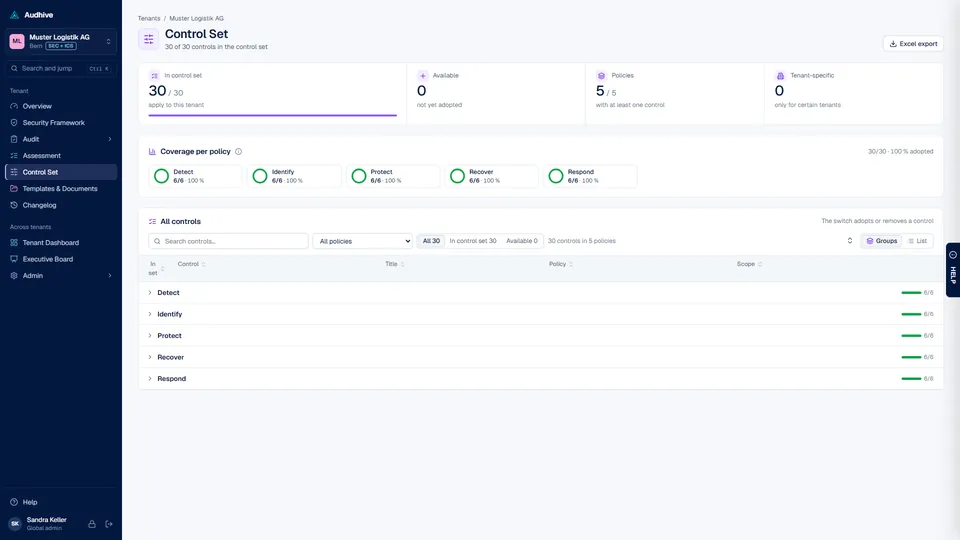
Define the scope
Load ISO/IEC 27001:2022 or the ICT Minimum Standard 2023 in the setup, or bring your own framework as CSV. In the control set you decide per tenant which controls apply – the coverage per policy shows at a glance what is in scope.
-
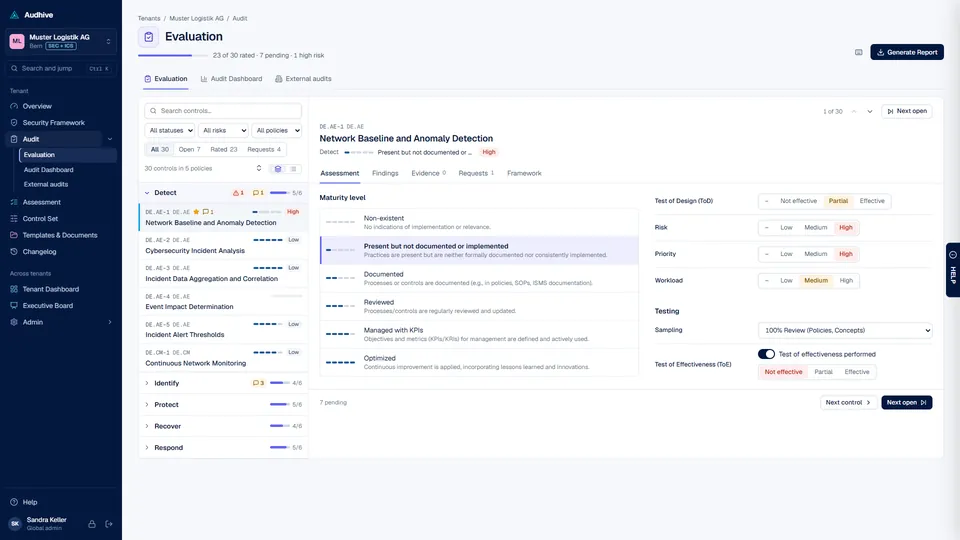
Assess every control
On the left, the controls by policy with progress, high risks and open requests. On the right you rate maturity, design, effectiveness and risk and record findings. Evidence and requests are in the same view.
-
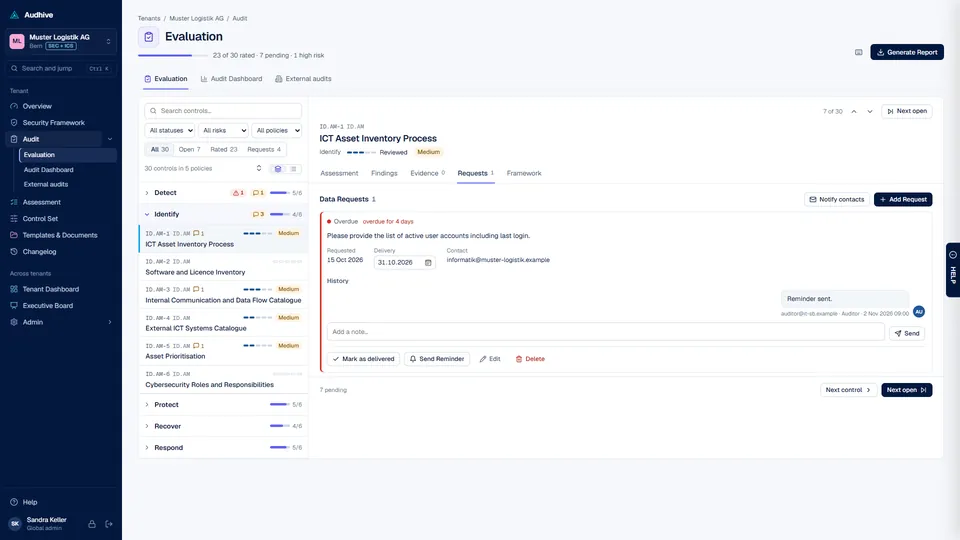
Request missing evidence
A data request with a due date goes to the person responsible. Notes and the history stay with the control; Audhive sends reminders, and you mark deliveries as received and accept or reject them.
-

Keep track
The audit dashboard shows progress, average maturity, risks and the state of all data requests – and lists the next steps: overdue requests, deliveries waiting for review, controls still to assess.
-

See where you stand
The overview compares the maturity per policy with the target in a radar chart, with status, statement of applicability and open risks. Every chart has an info button that explains what it shows and how it is calculated.
-

Report to the management
“Generate report” creates the audit report as PDF in German, English, French or Italian – with a ZIP of all evidence. Your own reports come from the Report Builder, the comparison of all tenants from the Executive Board.


Processes in detail
How the most important processes run in Audhive – step by step, with the screens you will see. Click a picture to enlarge it.
Self-assessments for the internal control system (ICS): questionnaires by topic, answered per tenant and signed by the people responsible.
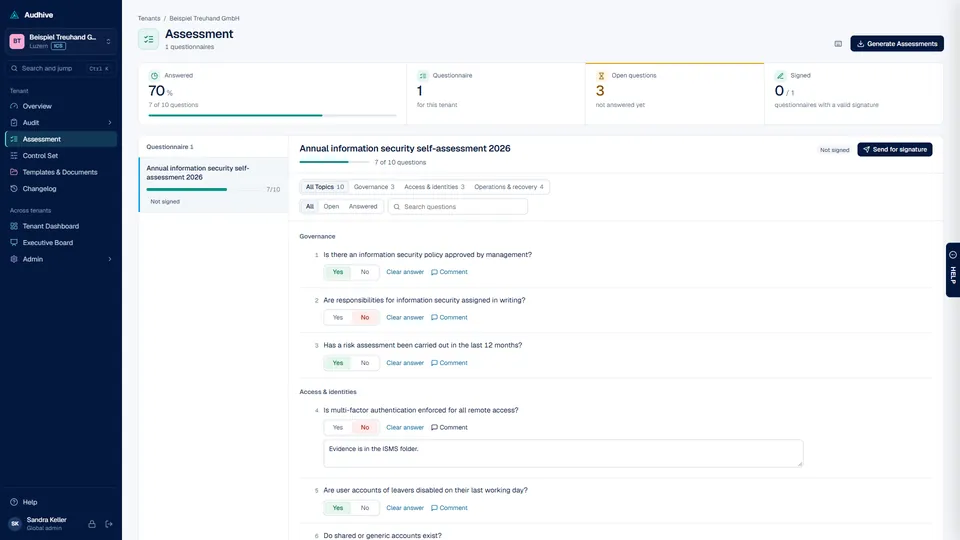
Answer the questionnaire
Yes or no per question, with a comment where needed. Topics as segments, filters for open and answered questions, progress per questionnaire.
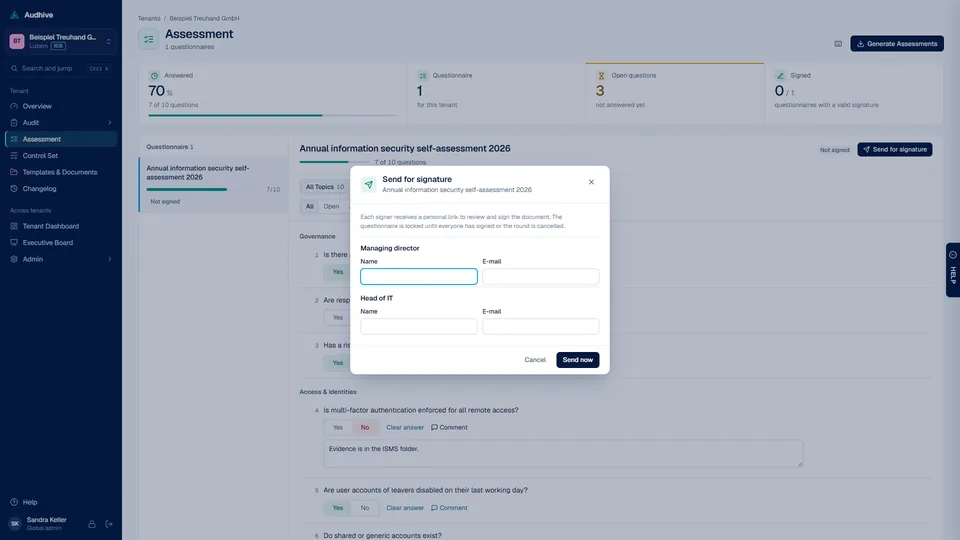
Send for signature
Enter name and e-mail for each signer role – for example managing director and information security officer. Each signer receives a personal link to review and sign.
Signed and locked
Until everyone has signed or the round is cancelled, the questionnaire is locked. You see the status, can send reminders – and create the assessment as PDF.


Besides the standard audit report you build your own reports per tenant from blocks – and create them in German, English, French or Italian.
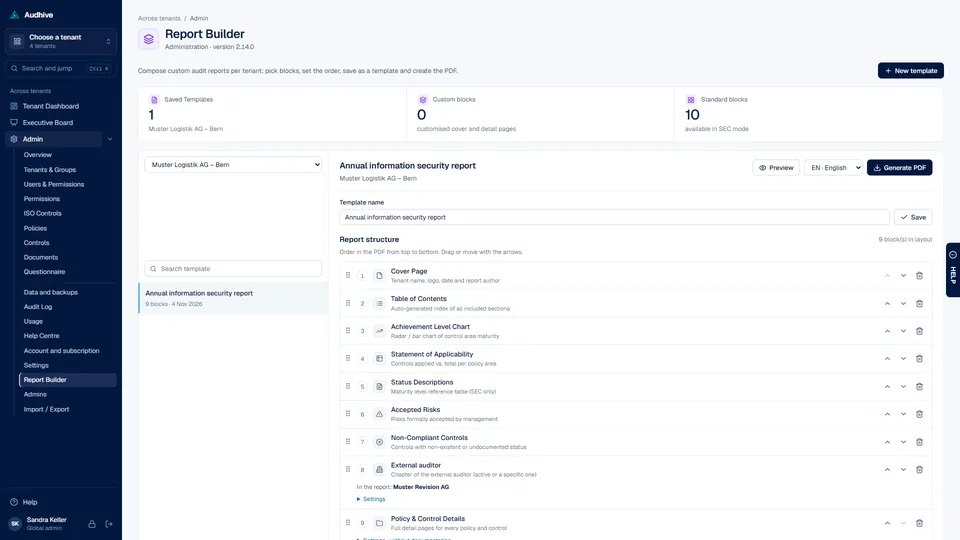
Assemble a template
Pick blocks – cover page, table of contents, achievement chart, statement of applicability, status descriptions, accepted risks, non-compliant and focus controls, policy and control details, external auditor – arrange them and save the template.
Settings per block
Blocks have their own settings: list evidence and documentation in the control details or not; for the external auditor chapter which audit firm, a new page, a header box and numbering. Your own variants of cover and detail pages are possible.
-
Choose the language, create the PDF
German, English, French or Italian, independent of your interface language; in the Report Builder with a preview first. The standard audit report comes with a ZIP of all evidence.

An external audit firm contributes its own chapter to the audit report – maintained in Audhive, in German, English, French and Italian.

Add the audit firm
Under Audit › External audits per tenant: empty, with standard sections or copied from another tenant including the logo. Several audit firms are possible, one is active.

Write the chapter in several languages
Header, logo and sections with a live preview as in the PDF. With an AI key, Audhive translates the sections automatically and marks missing, outdated and automatically translated texts.
The auditor maintains it
With the role “External auditor” the audit firm only sees the entries assigned to it and edits header, sections, logo and translation itself – without access to the rest of the audit.
Into the report
The “External auditor” block in the Report Builder places the chapter of the active firm in the report – in the report language, with table of contents and bookmarks.


From the order to the first tenant in a few minutes – the cloud instance is set up automatically.
Order
Choose mode, billing and the address of your instance (e.g. yourcompany.audhive.io) on www.it-sb.ch and pay. The instance is created with its own database; the welcome e-mail brings a set-up link valid for 72 hours.

Set your password
The link opens the welcome page of your instance: choose a password with at least 10 characters.

Second factor
Scan the QR code with an authenticator app and confirm the code – or set up a passkey.

First tenant
Name and location of the organisation you audit. Further tenants follow later under Admin.

Start working
You are signed in. The dashboard shows what is still needed – for example the control set of the new tenant. Continue with users and roles.


Add controls, policies and ISO references to an existing library – checked before anything is changed.
Prepare the file
Under Admin › Import / Export download the template “combined import” or export your library and add new rows – CSV with comma, semicolon or tab, UTF-8 or Windows-1252.

Check the file
Audhive checks required fields, lengths, references and duplicates – within the file and against the library. Errors are listed with row number and reason; existing entries are recognised and skipped.
Add
Only a file without errors is imported: new policies, ISO references, controls and translations (German, French, Italian) in one step. Existing entries are never changed. Then decide in the control set which tenants use the new controls.

Your data belongs to you: export it completely at any time. In the cloud, we also back up every instance every night.

Export everything
One ZIP with an Excel file (one sheet per table), a CSV per table and all uploaded files. Passwords, second-factor secrets and access keys are not included. Global admins start it; it runs in the background.
Nightly backups (cloud)
We back up database and files of every instance every night, encrypted – the last 14 days, plus weekly and monthly states. You see them under Admin › Data and backups.
Request a restore (cloud)
Choose a backup and add a note – we check the request and restore after approval. Self-hosted, you back up under Admin › Backup, also as a scheduled job.

Walk through the workflows yourself
The demo contains four fictitious tenants with assessments, data requests and a questionnaire.